
- Blogging_: categories categories categories in Blogger blogs
You can have categories in your blog in 5 minutes flat!
Freshblog (mentions), Ubi Dubium Ibi Libertas (mentions), Brown Rab Girl Fish, Great Britain, not little England (mentions), 7CM Internet Marketing Blog (mentions), Gavin Corder's Blog, Pike Mot Samtiden, This is not my country, Tempus Fugit (mentions), Capital Defense Weekly, Em duas línguas (mentions), Graça Morais, par Lui, avec Lui et en Lui , For Myself and Strangers , idei de imprumut , A Rare View, Okazu, the truth hurts, Amateur Gardening, Forest Law, mckib•in•nihon, owsblog and many more - see my technorati ranking and google search.
Many bloggers have noticed that categories are not supported in Blogger. If you've used them before, you'll know categories are a good thing to have. In fact, many other blogging sites and popular blogware such as WordPress actually allow bloggers to create/manage categories and classify all their posts under them.
It is possible to have categories in your Blogger blog. A simple search (in Google or Blogger) shows that there are hacks to do it (see my previous post on which are the more popular techniques). However, these hacks are a little complicated for some, especially if you only need a basic category function. And most of these hacks rely on external sites to do the tagging, such as Technorati and del.icio.us.
If all you need is a simple yet effective categorizing feature in your blog, here's how you can do it in 5 minutes flat. I even wrote a script generator, so you can easily generate the code to add to your sidebar template (very much like adding new links or Adsense code). In the spirit of clarity, I rehash what I posted previously here:
|
Looking to include categories
in your Blogger blog? Check out these blogs that use my netcf2 hack:
... Pop Culture Jeblog an entertainment blog reviews on music, DVDs, books... |
Freshblog (mentions), Ubi Dubium Ibi Libertas (mentions), Brown Rab Girl Fish, Great Britain, not little England (mentions), 7CM Internet Marketing Blog (mentions), Gavin Corder's Blog, Pike Mot Samtiden, This is not my country, Tempus Fugit (mentions), Capital Defense Weekly, Em duas línguas (mentions), Graça Morais, par Lui, avec Lui et en Lui , For Myself and Strangers , idei de imprumut , A Rare View, Okazu, the truth hurts, Amateur Gardening, Forest Law, mckib•in•nihon, owsblog and many more - see my technorati ranking and google search.
Many bloggers have noticed that categories are not supported in Blogger. If you've used them before, you'll know categories are a good thing to have. In fact, many other blogging sites and popular blogware such as WordPress actually allow bloggers to create/manage categories and classify all their posts under them.
It is possible to have categories in your Blogger blog. A simple search (in Google or Blogger) shows that there are hacks to do it (see my previous post on which are the more popular techniques). However, these hacks are a little complicated for some, especially if you only need a basic category function. And most of these hacks rely on external sites to do the tagging, such as Technorati and del.icio.us.
If all you need is a simple yet effective categorizing feature in your blog, here's how you can do it in 5 minutes flat. I even wrote a script generator, so you can easily generate the code to add to your sidebar template (very much like adding new links or Adsense code). In the spirit of clarity, I rehash what I posted previously here:
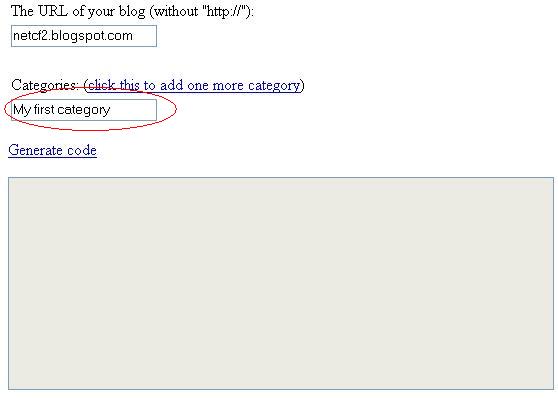
- Visit the script generator here.
- Enter your blog URL in the first textbox. Leave out the "http://", and very importantly, leave out the "www." as well (this is because www.yourblog.blogspot.com is actually an alias to the actual yourblog.blogspot.com)
- Next, enter your first category in the next textbox.
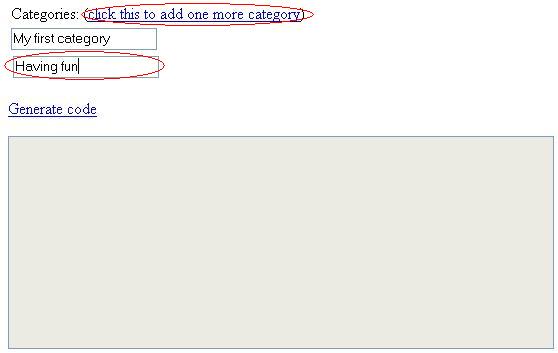
- To add one more category, click on the link "click this to add one more category" and enter it in the textbox that appears. Repeat this step, if necessary, to add more categories.
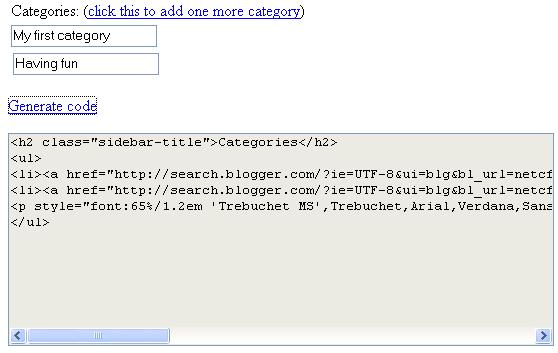
- Finally, click the link "Generate code" to generate the code. Click on the code and press Ctrl-C to copy the code.
- Go to your blog Template and look for the section called sidebar. Then paste the copied code at the place where you want the categories to appear.
- Save your template and republish your blog.
- Note that this technique (or hack) actually makes use of Blogger Search to categorize your posts. Thus it is important that you name the categories appropriately so that the search results return the correct posts. The category name should contain keywords that appear in your post. One extremely effective way, which I use, is to either (1) prefix every post's title with its category name, for example, "Blogging: categories categories...", or (2) ensure that your post contains the category name somewhere.
- (You may need to republish your entire blog sometimes, to let Blogger index your pages.) If you find that Blogger Search is not searching your blog, check that you have activated the "Site Feed" and "Notify Weblogs.com" features for your blog (under Settings), and that your template does not contain a meta tag to stop the search bots from indexing your blog.
- You are done! If you like my technique/hack, please support this blog by making a small donation via PayPal (click the icon at the top left of this page). Any amount is appreciated. Thank you.



250 Comments:
Cool of you to have done this. I found you linked from...another blog (I think it might be called The Myth.) In any case, what I'm trying to find is a solution to the issue of tagging posts to reach the technorati index. Does this help with that?
thanks
gregoryp(tm)
of Lucid Dreaming
My solution doesn't do auto tagging to technorati yet, but I'll definitely look into this. Meanwhile, why not try my BlogSearch hack? And do let me know if it works well for you. Thanks!
I think your script is very well thought : making use of Blogger Search is smart.
As it is a full text search, I'm not sure you actually need to put your category name in the title, which I find quite annoying. No?
The only weak side that may prevent me from installing this (I AM looking for a solution simple and powerful) is precisely the full text search : tags are supposed to have an added value (creating virtual grouping) that full text search does not.
What do you think ?
Yes, I agree with you that with full text search, I can place the tags within the body of the post. I might do this in the future, thanks. A problem that I faced was that if the word "blogging" appears in a post which I filed under "Getting started", it will appear in the "Blogging" search results. Which explains why I'm now tagging my posts with "Blogging_", "Getting started_", "Controls_" (notice the extra underscores), such that only the correct posts appear in my search results. Notice also that the search results display the posts in reverse chronological order, which is good.
Hi, I have also made a category solution for my blog, that presents the blogger search in my own design. It's a little irky to set up, but once that is done it is super easy to set up new categories (see the righthand menu)
http://pappmaskin.blogspot.com/2005/10/blogger-categories.html?tag=Music
One cool thing I found out recently is that I can use one of the Delicious bookmarklets for blogthis to insert tags that link back to my own site, and still be indexed by technorati, making it pretty complete.
I hope technorati will add a search that lets me limit a search on their site to indexed posts on my site, that way I could have even more control.
Check out the Filed in part of this post. http://pappmaskin.blogspot.com/2005/11/jeffpipascom-ajax-form-processor.html
Roberta, I've checked through all your blogs but couldn't find one that's using categories (maybe you removed it). My guess is that you have not "categorized" your posts yet. For example, if you have a "Super Recipe_" category, make sure that every post you filed under it has these keywords either in its title (which I'm doing for mine), or in its content text. Hope this helps.
Dear m., I've looked at your blog and indeed it's an amazing way to do categories. The good thing is that it brings the user back to your own blog, but I guess it might be a little hard for a newbie to set it up. I'd recommend intermediate-level Bloggers with a little JavaScript knowledge to give it a try! It's really amazing.
deviousdiva left a comment in my earlier post on categories:
"Well, I just want to say a huge thank you to you and your brilliant hack. It works, it was easy and I am more than happy."
I'm glad to hear I have a satisfied user!
I've just added it to my entertainment reviews blog. It's a nice solution for someone like me who isn't an ace with code but is also trying to keep my blog from being completely generic in appearance. Good job!
thejebber.blogspot.com
Hi Jebb, thanks for using my hack. Nice entertainment blog you have! If you're interested in putting Google ads on your blog, I have step-by-step instructions at http://rightpoint.blogspot.com. Hope you find it useful.
Hi Dan,
I'm having a similar problem that Roberta was having in that only one of the tags ("music") seems to pop up on the search, even after creating the tags and whatnot. Could you take a look?
hoargard.blogspot.com
Hi Ferrante, I'm responding to your search results problem (you said only 1 post showed up). It's just a minor problem. Try republishing your entire blog, and wait about 5 minutes for Blogger Search to index your posts.
Also, can I request that you keep the "generated by netcf2" link under the categories? Thanks!
Huge thanks for your great hack. I'd been looking for a possibility to categorise my posts in Blogger for quite some time.
At the moment I've the tags in titles but will probably move them to the bottom of posts.
Thanks again!
Dear sampsa, you're most welcome. I'm glad to know my hack is suitable.
Thanks for this - I've got the categories set up. Now all I need is for the posts to actually go into the right categories. Can I just add the category names to the end of my post, or do I have to do something else?
Hi Tahoma Activist, the short answer is yes, you can "tag" a post by having the category name anywhere in your post. The long answer: to ensure your post shows up only under that category (and nowhere else), you have to make sure that all category names are "unique" enough, e.g. "local_news" (with the underscore). Experiment a little, and you will know what I mean. Thanks for using!
Hi J., I visited your blog. All the categories are working fine, except for "My Views on the News" which returned zero results. But there are no error at all. Have you tried searching other people's blogs?
Hi Roberta, thanks for your support. I've replied you at your blog.
Hi,
Thanks for this tip, it's really helpful. I have one question however, how do you change the font (and size) of the word "Categories" to match the other words on my blog? Thank you!
Hi Ole Tenant, I've responded at your blog.
This is great. Thanks for creating the script generator and writing the instructions on how to add categories. I was about to migrate to another blogging solution because I did not like the whole Technorati/del.icio.us technique. I posted about this on my blog and linked to your site.
Hi Robert, thanks for linking and blogging about my little hack. Appreciate it!
Thanxs a million Robert It has a been a long wish to add Categories to Blogs.I hope Blogger does it some day,that too soonr rather than later.
Hello, thanks for the great tutorial!
i do need some help though... i have followed along to the best of my knowledge and copied and pasted as much as i can figure ouit to cpoy and paste from other peoples "page source" and i still can;t get the search to locate any of the catagories i have created. any help is very very welcome! thanks!
my blog = http://italianart.blogspot.com/
Hi Daniel (of Italian Art Trip), I took a look at your blog. You're almost there. 2 suggestions:
(1) Try to republish your blog, so that it gets re-indexed.
(2) I also notice that you're adding underscores, i.e. the "_" character, to your post titles (which is good), but your categories code do not reflect it. Try adding the underscore to your code as well, for example, for the "Important Documents" category:
http://search.blogger.com/?ie=UTF-8&ui=blg&bl_url=italianart.blogspot.com/&x=0&y=0&scoring=d&as_q=Important%20Documents_
(Notice the underscore at the end).
Hope this helps.
Hi Danchong,
Thanks. But How do I actually create the image for "Categories?"
Ole Tenant, you'll have to use Photoshop or a similar tool. Alternatively, if you know the person who created your template, you can ask him/her to create the image for you.
It might be helpful for users to know that a single blog post can be referenced by multiple categories. Simply add multiple category names to the post's title. For example, you may categorize a single post by adding "Blog_:" and "Getting Started_: in the title. Then the same post gets referenced by both categories. Not sure if you mentioned that or not - I did not see if above. Thought it might be helpful to some.
hi Robert, you are absolutely right! yes, a post can be filed under several categories. thanks for the tip.
HI,
It doesn't seem to work for me. Could you help me pleeeeeeeeeeeeeeeeaaaaase?
Is it because I'm using multiple categories? or because I don't use the category in the title? 5By the way I've tried only one category + category in title and it didn't work either).
I feel like complete dumb, because it's working for a lot of people... and I don't see what's wrong. For the "art" category it even returns no result.
I'm really sorry to bother... would you mind having a look at my blog?
http://dizzydezzie.blogspot.com/
But anyway, thanks a lot for giving your tips :-)
hi dezzie, i went to your blog. Some categories seem to work. Did you try to republish your entire blog? Try it. Another way is to use the underscore to differentiate the category names from normal text, e.g. "art_" instead of just "art", like what I'm doing at my blog.
Hi,
Yes it seems to work now... Some of them weren't working the day I changed everything an had the categories. Maybe it took longuer sometimes for the robots to visit pages.
But thanks a lot to you and I'll change "art" in "art_" to see if it's performing better.
I thought I'd filter my titles so that the category name did not appear in the title. Feel free to use or modify. This assumes your category titles end with '_:'
In your head tag add:
<script language="javascript">
function filterCategory(category) {
document.write(category.replace(/^.*_:\s*/, ''));
}
</script>
In the body replace the $BlogItemTitle$ tag with:
<script language="javascript">filterCategory('<$BlogItemTitle$>')</script>
Edit: You'll also need to replace $BlogPreviousItemTitle$ with the following
<script language="javascript">filterCategory('<$BlogPreviousItemTitle$>')</script>
Hi Sean, thanks for the cool tip. I now put the category names at the bottom of each post (instead of in the title), together with the technorati tags. Nevertheless, I'm very impressed with your creativity!
hi Michael, try republishing your entire blog.
did everything as said and it doesn't seem to find the text in the blogger search... the blogger search itself seems to only find things sporatically... I have republished the entire blog and even waited overnight...
any ideas? www.benjaminhammond.com
anyways, thanks in advance for a great solution.
hi ben, i'm really not too sure, but could it be that your blog is not hosted on blogspot (even though you use Blogger to do publishing)? maybe blogspot blogs get indexed by the search engine bot faster. have you tried this hack on a blogspot-hosted blog?
ya, i guess that might be it... i made a new post today, and that one turns up, so i guess the blogger search just takes a lot longer to index old posts that aren't hosted on blogger... i dunno. i haven't tried this on a blogger hosted blog, but ive seen that it's working fine for everyone else.
nice solution anyways, well done. Have you thought about a way to add a number count next to each category to keep track of the number of posts in that particular one? it would require a lot more code, but i thnik with php or java you would be able to implement it ... but i guess that defeats the simplicity of this solution.
oh blogger.... you're so close...
Wow, thanks so much for this! It works flawlessly! What's nice is that it's such an easy mod I can just keep adding categories as need be (after republishing of course). It works nicely with the greasemonkey script I'm using to generate technorati tags. Since the tags are just text they act as keywords for each category.
hi Josh, thanks for using! i like your blog on Japan.
and Josh, your babies are so adorable!
Hi Dan, thanks so much for this elegant fix! You can see the result in my blog, where I have also given you rave reviews as of today's date :-)
hi Pam, thanks for your support. I like your very reader-friendly blog!
Dan, your category fix is awesome! I do have one question. Do you know how often they update the search data? It never seems to go through right away, or even after a day. It's hard to experiment with where to put the words when it doesn't show up in the results. And they don't respond to questions.
Thanks!
Mort
www.opinionstew.blogspot.com
hi Mort, thanks for your support. For my blog, a new post will take about 30mins or less to show up in the search results. This is speaking from my personal experience. I visited you blog - I can see that your latest post is showing up in the search!
thanks this is the only trick that worked on my blog so far
Great hack! Thanks a bunch.
hi Mort, regarding how often does the Blogger search bot index your pages - my answer is that it really depends. For my case, it generally indexes pretty quickly, in a matter of minutes, but it can sometimes take much longer (like days).
very cool :)
hi, tray to take a look here : HOWTO : Blogger Categories
I've found i very easy way to reach that but.
I'm trying to set up categories using your (remarkably user-friendly) system, but it just doesn't seem to be working out for me. I've done everything you wrote about, as well as all of the suggestions from the comments that applied to my situation. It seems, though, that the blogger search function is just picking and choosing what it finds. Is there any way to make sure it searches the archives?
Hallo, very nice suggestion.
On my blog all went everything good.
But it won't to show me the newest post.
PLEASE HELP. What can I do?
hi Anonymous, have you tried republishing your entire blog? Sometimes you might need to wait a little longer for the search bot to index your latest posts. Archived pages are indexed as well, so the hack should work on them too.
@ danchong
i republished my blog befor I've posted that. It was a full republishing of the blog. One day moved by the same thing. It wont show any new posts. I tried with "words", then with "words_". All the same. Any solutions!?
Hi Anonymous, do you mind giving me the URL to your blog? I suspect it could be due to the site feed settings in your blog config.
This is a wonderful approach. I have oone idea, however, that might be helpful.
Is it possible to co-opt Blogger's "Link" field to contain the titles and convince Blogger Search to only look for content in that field?
This would allow one to simply list the keywords in the Link field and design their template to include the link field rather that having them in the body of the post. This makes it easier to customize their look (since you can just warp the Link tag with a div in the template) and you also needn't come on to the Foo_ convention to avoid conamination when an unintended keyword exists in the body of the post.
Can this be done?
I have another implementation of categories, check it out here.
Hi, this seems to be the simplest method I've come across. Very clever! However, I seem to have troubles implementing it on my own blog. I've reindexed many times, activated "site feed," and "notify weblogs.com." I did this yesterday and the search results turn up nothing. What did I miss/do wrong?
hi glaides1, your problem could be due to your blog URL setting. Check out my comments on related problems at here (scroll down).
I checked the page you asked me to and read through the comments twice, but still didn't find what you were referring to. What do you mean by "blog URL setting"? And how do I change this?
Sorry for being such a pain but I do appreciate your time and effort! Thanks.
Hi glaides1, do you mind giving me your blog URL (can't see it at your profile page). I'll try to figure out what's wrong.
hi JDoe, have you looked at step 9 above? Try to check your blog settings. And try republishing all posts.
Dan,
This hack is awesome! I picked some categories, generated the code, pasted it in my sidebar and with a little tweaking, got the proper results! All told, probably took me less than five minutes to implement categories on my blog. Maybe later, i'll go through and tag all my posts, but for now, this works perfect!
Thanks, man! Just what the doctor ordered!
Hi Dan
Firstly, you are really kind to share your knowledge with us ... I really appreciate it being a complete blog ignoramus.
I tried to follow all the steps you listed and added the tag at the bottom of my posts. It worked for the recent posts and some of the old ones but not all! I'd checked that my sitefeed is activated, republished the entire blog more times than I drank water today and that I'd tagged the posts I wanted categorised but almost 70% is still not being picked up. Am I being really daft and missing something?
hi MM, interesting comment. "Mana Makan" sounds like a Malaysian blog. I'm from a neighbouring country!
Regarding your posts not being picked up by the category search, I think Google (the blog search engine) has an old cache of your older posts. Type the following in Google, and click "google's cache", and you should see an old copy of your post without the tag: "thefeastcrusade.blogspot.com/2005/08/portuguess-kielbasa-kale-soup.html"
I guess all you can do is just sit back and wait for the Google's bot to re-visit and re-index your older posts.
Hi Dan,
Now that I have my feet wet with categories, I would like to try and get more advanced. I'm planning on tagging all my posts at the bottom with a "Filed Under Gundam_" or whatever tag. When I see this kind of thing in other blogs, they are usually hyperlinks to that category. Is there a way to create a tag that is a hyperlink as well?
thanks!
Dear toybot studios, sure you can tag your posts with hyperlinks. In fact the HTML code to these hyperlink-tags are what you added to your sidebar template. All you need to do is to paste these hyperlinks to the bottom of your post.
Hi Dan
Thanks so much for the clarification. Sounds kind of complex but I will try it out. And I'm not in Malaysia but in Singapore! Thanks again!
Dan,
Thanks for the tip. I'm half way through tagging my posts with the hyperlink as you describe. Crossing my fingers. How often does Google re-index? My initial categories with the underscore are not pulling anything yet. Do I need to do anything else?
Dear toybot studio, I visited your blog (nice toys!), did a simple search (e.g. search for the word "the") and noted that the most recent searchable post is the one on Supersylph Yukikaze. This means that the search bot has not indexed the more recent posts. I guess you'll have to wait a couple of days for the bot the index your new posts, and then test your categories.
Hi Dan,
I think something is wrong with my categories. I've noticed that my lastest posts have been indexed, but when I click on the associated categories, the posts are not coming up? Do you think the code is broken?
I was able to get the searches up and running on my new recipe blog. I think it's going to work out nicely but it did take some thinking and tinkering to get it worked into the format, develop the keywords, etc. I could not get the Google search to pick up previous posts where I had edited in keywords. I noticed that it was picking up my new posts almost immediately -- apparently they are indexed when posted the first time. I didn't want to wait for the Google bot to pass by, so I deleted and re-posted the old recipes and they appeared in the search within minutes after being re-posted. I am glad I came across this in time to use it from the first in my recipe blog.
hi Genevieve, thanks for the info! I'm glad that it works for you.
hi toybot, I noticed something weird and I'm not sure if Blogger Search behaves like that all the time. Try to search for the phrases "the really" and "really interesting", both of which are found in your latest post. Only the first search will give you results. This means Blogger is not indexing your entire post, which also explains why your category keywords are not indexed.
This is strange. May I suggest you try to post a short test post and put in the links the same way you have done. If the test confirms that Blogger is indeed not indexing your posts in full, maybe you can include the category links at the top of your posts?
Dan,
So I am trying a test post with a bit of text and the tags / hyperlinks. Based on what you described, I tried searching on random phrases both in the top and bottom of the article. "Really interesting" did bring back a result, but not all the phrases did. It didn't seem to matter if they were located at the top or bottom. blogger does not seem to be indexing everything. Now i'm wondering if Blogger is just indexing what it deems as "keywords" as opposed to full text?
dear toybot, you should search phrases by enclosing with quote marks, e.g. literally typing "really interesting" in the search box, including the quote marks.
I did an experiment with another blog that has very long posts, and every single post was completely indexed.
I'm really not sure by Blogger does not index your posts in full (or maybe it needs time?).
As I suggested, maybe you can try putting the category links higher up in your posts.
Dan,
Your suggestion on the test post yielded interesting results:
The first two tags were indexed but only brought back the test post. The second two tags were not indexed and did not return any results??? How crazy is that?
But in fairness to Blogger:
1. Search is still in Beta
2. I think it might take a bit longer to index the complete post, older posts, etc. than I had anticipated
3. I will give it some time as you suggest and see what the results look like in a couple of weeks.
hi toybot, I think it's working for your recent posts now. Strangely, for your test post, it's indexed all the way till just before the last category (as of now).
Well, the good thing is your Edward Lee post is now completely indexed.
Guess the search engine takes a couple of days to fully index new posts.
Hi,
I think your script is really easy to implement and serves the goal. Unfortunately, in my blog it does not show results in some categories (eventhough I place the key word in the title with an "_"), for instance "Maitreya", which appears in several places, in title as well as content.
chwuethrich.blogspot.com
dear Chris, I'm sure you are aware that the keywords need not appear in the title. But if you would like to stick with having, e.g. Maitreya_, in the title (which is a good way if you're ok with the extra word), then you should make a little change to your template code. Locate this part in the generated script:
as_q=%22Maitreya%22
Change it to (add a small underscore):
as_q=%22Maitreya_%22
Do the same for other categories. And don't forget to republish your entire blog. Also note that the search engine takes some time to re-index all the previous posts. I note that some of your posts have already be indexed.
p.s. I am absolutely fascinate by crop circles!
Dear Dan
thanks very much for your info. If I understand right, I could leave it like it is and make sure, the key words appear in the text. Then no changes are necessary.
Or make the changes in the search as you mentioned and always add the key word in the title.
Thank you for your info and work. It is not for granted having someone publish a script like you and giving support afterwards.
Thanks a lot!
If you are looking for genuine info about crop circles, see www.shareintl.org and search for crop circles. The info given might be a challenge, but it seems to be correct.
Take care, Chris
hello La Greluche, I visited your blog and noticed that the search works for your latest post. I guess it'll take a while to re-index your older posts. I'm quite sure you implemented the technique correctly and it should work almost immediately for new posts but will take a little longer for older posts (based on my experience).
Huge thanks for this. I had been searching and was about to give up when I cam across your easy to use instructions. It took a while for it to work (while I pulled my hair out wondering what I had done wrong) but it just needed time - must be a Blogger thing.
Hi tried your code for creating categories and the categories were created beautifully except that clicking on those links does not lead to any results. i did read a lot of the comments that have been posted to check whether i have done anything different, but dont think i did that. i have waited for almost a week but blogger hasnt picked up the words. is there anything i could do?
my url is http://reshmaanand.blogspot.com/ incase you want to take a peak and see whats happening. thank you anyway for the effort you have put in so far.
Hi Reshma, when entering your blog URL in the script generator, it's very important to leave out the "www."
So instead of "www.reshmaanand.blogspot.com", you should enter "reshmaanand.blogspot.com"
Hope this helps. Thanks for the support.
thank you so much. That worked and that really helps !!!!
A fellow blogger suggests implementing a "count" for each category, e.g. "Fashion (10)" to indicate there are 10 posts under the Fashion category.
See his comments and my reply here.
I wonder if there are many more bloggers who need this feature. Please post a reply here if you do. Thanks!
hi. number of posts against a category does sound like a useful feature to have.
I am having a hiccup again with the categories on my blog page. I updated the categories sometime back and now again blogger search does not pick up the categories - i am assuming since i have got the url right this time, it would in some time.
But for one of the categories - it picks up links from all other blogs and i was suprised to see 750 entries against that category. Would appreciate your help on this. THanks in advance :)
Also thought this is not the right context to put this comment - was looking for something that would allow me to import my posts from one blog on to the other, both hosted by blogger. wwould you know anything about this?
hi Reshma, I visited your blog. Seems you are using a different technique that involves JavaScript. Which was the category that gave you the 750 entries problem?
hi danchong - sorry about that. I did try a couple of different codes but did not find anything working smoothly. could be something that i was not doing properly - though both the methods that i tried would pick up posts for some categories and not pick up for others. and here i talk about only new posts, i am aware of how the old posts take time to appear. so i have switched over to tags. though i know its not the same thing - but it does serve my purpose of indexing posts. thanks for the help so far...
hi Zee, I visited your blog. The "people" category works!
hi Reshma, I visited the 2 blogs in your profile, but seems like you're not using the category technique. If you'd like to re-implement this technique, just post a comment here and I'd be happy to help.
I have another idea for categories on blogger.(is by making archives. Look at my blog, you will understand http://stupid-ideas.blogspot.com/) The only drawback I care is this: the posts on the manin page are not categorised and when I categorise them I have to change their date, with this I lose some links. Anyway, I think this can be solved with some javascript that can let me choose which posts to apear on the main page.Anyone who know how to do that please email me.
This is my blog: http://stupid-ideas.blogspot.com/
and this my email: ionut.ro at gmail.com
P.S. excuse my english, is not my first language
Danchong,
I love the concept and have started to use categories based on what you have posted.
I am running into a problem that my older posts will not show up in the categories (even though I have re-published the entire site a number of times and have waited weeks to ask this question).
Is there some type of work-around that I need to implement so that it picks up all of my older posts?
Thank you,
Frank Sansone
hi Pastor Sansone, i visited your "A Thinking Man's Thoughts" blog. i'm quite sure that the old posts are well indexed by the search engine. well, at least for the searches that i tried, i received the expected search results. for example, "accelerate efforts" returned one of your oldest posts.
may i know which are the categories (or search terms) that don't work for older posts? some specific examples should help.
Danchong,
Here is an example of what I am referring to.
I have a series of posts on "The Best and the Brightest" that I have tagged as "Popular_" at the end of the articles (here is one of the articles The Best and the Brightest
When I look at the article, it has the "Popular_" tag at the end, but when I click on my "Popular" category link (which is really "Popular_"), only one post shows up in that whole category.
I am sure it is probably something simple, but I haven't been able to figure it out.
Thank you for your help.
Frank Sansone
hi Pastor Sansone, I suspect that old post has not been re-indexed yet. I searched for the phrase "deem it appropriate and helpful" and that post showed up, which means that it has been indexed all the way to the end of the post. However, as for the newly added line at the bottom, it has not been indexed yet. Perhaps you'll have to wait for the search bot to re-visit that post. Or if you don't mind doing an experiment, try shifting the "File under..." line to the top of the post and see if this makes re-indexing faster.
Hope this helps.
Danchong,
I tried your experiment. On Sunday night, I added the category tags at the top of the entry. It is now Tuesday AM and it still does not show up, but I don't know how long it takes for things to be re-indexed (or if they won't re-index something after it is a certain number of days old).
Thanks again,
Frank Sansone
I just used your script to create a categories section but find that some posts come up and some don't.
It this also just a matter of lag time in Blogger's reindexing method?
WS.
Danchong,
Is there a way to stop the the category link from changing colors when you click on it?
Nick
www.risingdividendinvesting.blogspot.com
hi WS, yes you'll have to wait for the search bot to reindex your older entries.
hi Nick/Greg,
Look for these few lines in your template:
a:link {
color:#9db;
}
a:visited {
color:#798;
}
a:hover {
color:#fff;
}
And change the color code of visited to #9db and you should be fine.
Hi, Dan!!! Toda I put, your code into my blog. Thnks a lot! Regards.
Hi! thx for ur great method of creating categories.. but it doesn seem to work for me. i keep gettin
Your search - "Getting Started" blogurl:porridgewithoutsalt.blogspot.com - did not match any documents.
please help!
flamer_286@hotmail.com
Hi,
Thanks for this it's a great fix. Just wondering if it is possible to have the search show up in the blog template rather than the blogger's search results? any help would be appreciated.
Thanks!
Dear Daniel:
Thanks for your work on this. I've inserted the code and made the adjustments to weblogs.com and site feed, as you instructed, but I still can't get my categories to work. Would you mind checking it out for me? The URL:
http://www.standrewschattanooga.org/blogger.html
Thanks!
Hi there,
I did everything as described in the tutorial - pretty straightforward. I know that old posts need time to be indexed, but even with my new posts it doesn't work. I have been waiting acouple of ours but the 'search this blog' function does not come up with results (from my new posts from www.beuerbach.com).
Any ideas?
The funny part is: I have another blog (www.bollixologie.de) where the blogsearch function works fine. Within 15 minutes the keywords from my new posts were found. This is really strange.
Your help will be appreciated. Thx a mill.
hey...I did everything your tutorial said, and I put my category names into the title, i even added a few invisible phrases of the categories to ensure that the search will find it...enabled weblog and the site feed...but the search isn't finding anything...
http://sicnarf-.blogspot.com
thanks for the help..
There seems to be a problem with listing categories in blogger.
I used to have all my posts listed now I only have one per category.
Any other people having problems?
Thanks
Hi!! I´m having the same problem Luke is having. Followed the instructions (which are great, by the way!!) but the search comes up with no results.
Is there anything else I haven't done which I should be doing.
elhilodelafabula.blogspot.com
Same problem as the guys above. This great hack used to work fine. maybe Blogger is jealous and f*kkin' it up?
I also posted the problem at Blogger under Publishing domain broken.
It seems Blogger did a big update on the 18th that has cause a ton of problems, not just the category one.
Here is the link.
http://groups.google.com/group/blogger-help
I'm having the same problems.
Seems that Blogger Search is only returning at most 1 result for any search. I tried to perform actual searches on some blogs. And lo and behold, there's only 1 result for every search, any search.
Since this category hack relies on Search to work properly, it is beyond our control if Search is broken.
Let's wait and see if Google manages to fix it.
The search stuff doesn't search at all ..pls help me
http://jaem-lights.blogspot.com/
I think the search problem is system-wide as other comments have indicated: one post per blog. Blogger must be fiddling with their code or something.
However, I can't find anyone on the blogger groups complaining about this. Has anyone else? Sometimes, google/blogger will comment on the groups page if they're working on a problem.
I posted the problem under "Publishing Problems".
My thought is becasue it is not their code they will see this as a low priotity or none at all and ignore this problem.
Mine are back!
www.qualityg.blogspot.com
So are mine! Apparently, the search engine had some problems for the past few days....
Good that it's now back to normal and this hack/technique still works!
your idea of making categories is great but its not search engine friendly .
the main point for making categories is to get spidered by search engines so you can get ranked for main keywords and get visitors .....
Great script. I'm also trying to get the categories to work on my blog. Right now I'm just testing to get the "wedding" category to work. It's been overnight and the bots have not found my posts in the search. Can you check that my template doesn't have any code blocking this? johnnystaffordphotography.blogspot.com
Thanks.
I just ran feed validator to see if my blog was feeding correctly. It told me the feed uses an obsolete namespace. feed xmlns="http://purl.org/atom/ns#" version="0.3" xml:lang="en-US"
Is this because my template uses Atom version 0.3? If so, how do I fix this to version 1.0? I don't know php and am not hosting the blog myself.
Hi Johnny, the 0.3 version shouldn't matter (Blogger sets up the feeds to handle a few versions). I visited your blog and found that search is not working for any keyword. Could you check that you have activated the "Site Feed" in your settings? If so, maybe you could wait a couple of days to see if the search is working on your blog. To test, just type some common word like "the" in the search box right at the top of your blog page and click the "Search This Blog" button.
Hope this helps.
I love the simplicity of this category script, but it doesn't completly work for me. At the end of my posts I have "filed under -example category" but the search is not finding them. Grimgamer.blogspot is my site. It would be greatly appreciated if you could help.
I've tried implementing Categories using your code. It sort of works, but Book Club for example only finds 1 entry (it should find 2). If I search using Seach This Blog at the top of my blog, it finds both. Suggestions? Thanks for offerring this. Categories are important!
Hi Grim, try posting new posts and have a line saying "filed under -YourCategory". I did a search on your blog and found that if you had a "-Grim" category, it returns lots of results, so theoretically this technique should work well for you.
Hi Gail, your "Book Club" category now returns 2 results! Maybe it takes some time for the search engine to fully index your newer posts or posts that have been modified. Strangely, manually searching for 'Book Club', without the quotes, returned only ONE result for me!
Tnew release of blogger with categories will probably make your very useful method obsolete but in the meantime it works well as a solution. I have found it much easier to set up and use than other methods. One thing I did mess with that seems to work is the code from your generator. Your generator creates a search link that puts %22 around the category being searched, i.e. %22sports_%22 I understand this puts "" around the category in the search but this has caused 1 post to show up rather than all posts. When I remove these from the code, it searches the category without "" around the item and all posts listed under that category show up. Just though I would share in case people were having the same problems.
Can the search script include the "posted by" information at the bottom of every post.? In other words, I want to categorize by who posted rather than by what was posted.
hi anonymous, sure you can. if your posts have "posted by xyz" or "posted by abc" at the bottom of each post, you can name the categories as "posted by xyz", "posted by abc",... If you know HTML, you can also change the names of the categories to something more reader-friendly by amending the generated code.
This hack rocks. I just put it into my blog yesterday. I wasn't sure if I would like that it goes to a blog search page, but it is really cool. I only have a couple of posts showing up in the categories, but I can tell that it will look great in the future when I have more posts categorized.
Thanks for doing this.
Thanks.. great idea.
I have sussed how to put tags on mine too..
I try to remember where I saw the tag info.. ooops.. well thanks for this one.
take care.
Rob
I have implemented you hack into my blog, Chicagoray, and for the most part find it to be a clever work around to the missing categories function in what is now the old version of blogger.
However, as I went back to include tags in my older posts I began to discover that it seems the search will only find and display the most recent posts and never more than 4 or 5 per category.
I see that appears to be the case with other blogs implementing your hack as well. Am I missing something obvious that was adressed by an earlier post, or is this just the way it is? Any info would be greatly appreciated when and if you have the time.
Thank You Sir.
Hi Chicago Ray,
What you said is what I observed as well. It used to work beautifully until recently. As this hack is dependent on the search engine, I'm not sure if this problem is going to stay or is it just temporary. But I'm a little optimistic, as there is definitely a demand for good search results, my hack notwithstanding.
Hey love the tips for categories but it seems when I try to look at all of my posts in a certain category, I end up in the blog search page instead of my own blog page with all of the categorized posts in it. Could you see what I am doin wrong? thanks.
hi funnyface, this technique/hack actually uses the blog search to achieve its purpose. So what you are seeing is actually normal!
Very solid post. I like the way your script utilizes the blogger search engine. Please keep up the good work.
I have a little method:
1)Title a new post with the category name.
2)Write in this post the list of links under this category.
3)Save this post with the following options:
* date: 01-01-01
* no comments
* no links
(away from your actual posts, no modifications allowed)
4)Configure a link list: naming it categories, with links to the previous posts...
That's it.
It gets the job done.
hi, thanks for posting this!
i can't exactly get it to work though...
graffitireality.blogspot.com
(i tried two different types of categories... .community. and the world_ just to see if t wouldn't search the dots, but that didn't work)
do you know what i did wrong?
hi resa, I would like to help, but I don't see any category in your blog at this moment.
the categories are under ::our posts:: in the sidebar. i tried four categories in one post. .24-7. wasn't found when searched. .community. was found but so was other instances of the word community without the dots before and after. same results for .faith. the world_ worked perfectly, but i don't like the way the underscore looks. any idea why the search results don't work with categories like this: .category name. ?
advance search designing
Here's some useful info on advance search designing which you might be looking for. The url is:
http://www.jaldisearch.com/
I just wanted you to know that this was way easy to "install" and implement. I was also looking to be able to do a "file under" type of link at the close of each post, where I could choose a category to "file under." Is that possible and I forgot something.
I don't find it annoying at all when someone uses their category in the title. In fact, I find it easier to read and follow, which is why I've done that with all of my posts.
If you want to check it out on my blog, it is www.smudgebaby.blogspot.com
Thanks again....I do sincerely appreciate it.
hi Jen, thanks for your support. I guess you've probably figured that category links within posts are actually done manually - you are already doing it in your blog. btw, nice soft dolls you have!
Thank you! I love it. You are a genuis!
Dear Sir,
I tried to implement this feature, but with no success. What I've done:
1. Added some categories.
2. Activated "Site Feed" and "Notify Weblogs.com"
3. Made a little change in the javascript code, so now I have nice caption "Hold me, trill me.." and shorter key word "hold"
4. Waited for some time, so the bots can catch up.
Results: Still not working. Any help would be deeply appreciated.
Hi,
I'm on new Blogger and want to put the categories on my sites. I've been blogging for over a year on both - should I go back through each post and put in a term for the categories? I'm also new at this though I do know enough html & CSS to get into trouble.
Thank you
Georjina
Well i can't implement,you told to paste in sidebar,where exactly and i am getting errors,plz help me my blog is http://sidddd.blogspot.com and contacht me at siddddbhan@gmail.com
These comments have been invaluable to me as is this whole site. I thank you for your comment.
This comment has been removed by the author.
I've tried to insert the HTML script, but I've got the following message:
"the reference to entity "ui" must end with ';' delimiter."
Do you know what i did wrong?
One of the most fun and beautifully written posts for the last time, thank you.
If interested, can visit the blog with useful information on Pennsylvania Home Owner Insurance.
hi,nice job.but then it didnt work with me...i meant i tried sercin the sidebar and i did paste but it didnt work...mines is new tepmlate....
This comment has been removed by the author.
Thank you for sharing your knowledge.
The categories worked like a charm on my site. My computer know how is limited and your fix was easy enough for even the likes of me. Thanks again!
This comment has been removed by the author.
Men's Health and Women's Health, Anti-Diabetic and Anti Allergic, General Health and Sleeping Aid. All Drugs at
Buy glucophage
Buy inderal
Buy imitrex
Buy fosamax
Buy lipitor
Buy Imitrex
buy arimidex online
Buy mobic
This didn't work for me. It said that "ui" needed a ";" to close it. Not sure what that means but sure could use the help!
http://nontoxickids.blogspot.com
Hi good hack so far it sort of works. i only got one link under my chat there should be 5. but its early days yet. i put my chat as a prefix.
oh by the way you dont have to put it directly in the template you can go to page elements add html/javascript etc and ya done
thanks.
http://blogorious.blogspot.com/
Bad Credit Car Loan provides various information on bad credit car loans. Know more about personal car loans, used car loans, bad credit car loans and bad credit car loans UK.
Best XXX Trials
Hot XXX Lesbian Porn
Extreme Young Gays
X Live Sex
Live Jasmin Web Cam Sex
Teen Delight
Sex Porn Trials
Sex Cam Trials
Income 4 Surveys
Been wondering how to do categories...
Thanks so much for the solution...
You are an absolute star! If you were sat next to me now I would kiss you! :D
I have linked to your site on mine and posted about your hack!
I hope you will visit and comment!
Sarah
www.copywritingtipsandideas.com
Great blog! I will keep reading. Please check out my blog on baldness
Good Job! :)
Hello! I used the following approach to make it work as categories:
I append at the end of each post a string like [Category: Lifestyle]
or
[Category: General]
And I added a LINKS sidebar and add the links with the querystring of search of the categories strings that I append at each post.
Here you can see it working:
http://blogdotonyhenrique.blogspot.com/
Good Job! :)
I'm usually not a fan of Gehry's work, but this is an exception. Using wood as a wrapper imitating structure is not only novel, but ties the space down through the use of a consistent, inviting, and non-distracting material palette. Perhaps Gehry is more suited to small-scale projects Laptop battery.
Although I find this awesome, it doesn't work =/
Mp3Mountain.com is a great amount of mp3 music, collected specially for true music lovers. We always follow all the top hits and make sure that they are available for buying and downloading at the web site.
experimental ambient
acid jazz music
avantgarde mp3
blues mp3 music
breakbeat
celtic
chanson
chorus
christmas
classical mp3
comedy music
country
country bluegrass
country rock
dance
dance electronic
dance pop mp3
darkwave
Mp3Mountain.com is an "Everest" in the world of music. Small-sized mp3 files are easy to be downloaded that is why they are so popular all over the world. Listen to the music in your players and cell phones, in your PCs and in the car.
Good Job! :)
Hi.
I am also getting this:
"the reference to entity "ui" must end with ';' delimiter."
I don't know what I'm doing wrong?
Great Post. I really need this trick for my self improvement blog. Now i implement the trick and see what happens. Thanks for post.
Danke shön
Porno izle
Thank you for doing this tutorial - however, it is not working for me as well.
I paste the code in the sidebar section, but nothing happens unfortunately. I am a little confused as to where to paste it within the side bar section as well. It's all a little mystifying.
If anyone could help, that would be great.
Kind regards,
Andrew
good post :)
Not sure if Blogspot ever picked up a category widget as I couldn't find it and it's 2009. I came across your post during a Google search. I added the code in under the gadget HTML/JavaScript section and it worked.
Thank you so much for sharing!
hell
Thanks for all
this information about Generic Viagra is really great
have a nice day
It doesnt work on me,too?
Thanks for the tips..just trying follow on KERJA KERAS ADALAH ENERGI KITA
I really like this blog, you are very good making them. I say that the issue discussed in this blog is quite interesting and of high quality.
Generic Viagra
I really like this blog, you are very good making them. I say that the issue discussed in this blog is quite interesting and of high quality.
I really like this blog, you are very good making them. I say that the issue discussed in this blog is quite interesting and of high quality.
your blog is very interesting. Nice idea
your page is so nice
i love samara Costa-RicaRealEstate
מחזור משכנתא
כוסיות
משחקי חשבון
גירושין
משרד פרסום
עיסוי
casino
blackjack
roulette
מתנות חינם
רעיונות למתנות
מוח 1
תפילין
חתונה
קידום בגוגל
מיכל
תינוקות
חתונה
לימודים
מוח 1
קידום בגוגל
Costa Rica is a country with an extremely sense of freedom. The landscapes are for many people the greenest in whole center America. The chances of investments are very high; the average of Americans, European and people of the entire planet who are buying here is up in the sky!!! Great investment opportunity in Costa Rica
I also am doing something wrong I need help with the termination "ui" ... please
hello I love your information helped me a lot to me and my family.
I recommend it because my friends are also in doubt thank you very much for this information
hello I love your information helped me a lot to me and my family.
I recommend it because my friends are also in doubt thank you very much for this information
hjvuhghvjyguh
Hi, i'm really interested in this post...I want to know more about "Blogging_: categories categories categories in Blogger blogs".
Thats exactly what I was searching in this time...
Thanks!!!
It’s great whenever someone asks me about Costa Rica, best vacation hotels, the real estate investment outlook, or the wellness aspects. I enjoy sharing my experiences in making choices when visiting Costa Rica’s southern Pacific Coast.
its a great post!thanks
I really liked your article.I love flowers...I am also interested to send flowers all over the world....
I suggest this site to my friends so it could be useful & informative for them also. Great effort.
thanks
I not completely sure that if you have many categories that will help you a lot I'm using blogger for a long time and I just prefer to use it in the normal way .Buy Viagra Generic Viagra
this is not the right solution but it gives me an idea to solve this issue
Post a Comment
<< Home